Application Level Access Control
RAMPART APIs integrate with your policies to provide fine-tuneable application access to your users on a per-application basis. You can specify a tenant level access policy that will apply by default to all applications, and then override it for any given application.
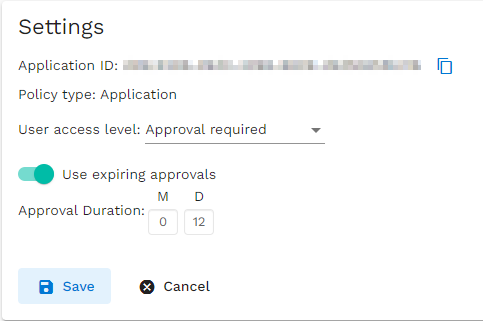
Access Modes
- Open Access: All users inside your B2C tenant will be allowed to access the application. No user assignment/permissions required. If assignments are present, the scopes associated with them will be returned.
- Approval Required: Users in your tenant will not have direct access to the application. When they attempt to sign in, they will have the option to place an request to be granted access to the application. This will place an approval request in the system, and if granted, the user will be allowed to access the application on subsequent logins. Admin assigned users will have direct access.
- By Invitation Only: Users cannot access an application unless they have been directly been assigned to it by an admin. There will not be an option to request access.
- No Access: No one can access the application. All logins will be rejected.
[!WARNING] On changing access modes, it is possible for existing users to lose access to the application. Even if they are already using it. E.g. a user who acquired access to an application when it was in approval required mode will lose access to the application again if it's mode is changed to invitation only.
Limited Time Access
Users can be granted access to an application that will expire after an set amount of time has passed. After expiry, the user will need to gain access afresh. This can be especially useful when enforcing access policies/inviting external users for a limited time. This can be configured as part of the application access policy.
[!NOTE] A timed access User Assignment is written at the time of granting access. It will expire after the specified duration has passed from the time of approval being granted. So for example,
- If you grant someone access on 1st of a month for
10days and they access for the first time on the 5th, access will still expire after the 10th.- If you grant someone access when the Approval Duration is
12days, and later the approval duration is revised to24days, people who were granted access when the approval policy was 12 days will still lose access after 12 days.
All other rules of the access mode remain the same.